跳至内容
跳至内容 
目录
在选择 USB 数据线时,您可能会遇到标有 USB-IF 认证的选项。选择一条 USB 数据线时,请注意以下事项: USB IF认证USB线缆 确保符合严格的安全、性能和兼容性标准。使用 USB IF 认证的 USB 数据线有助于保护您的设备免受过热、短路或数据丢失等风险的影响。相比之下,未经认证的数据线通常缺乏适当的质量控制,这可能导致设备损坏、数据传输速度缓慢或供电不足。选择认证数据线可确保每次连接都可靠且安全。.
关键要点
- 选择经过 USB-IF 认证的线缆,确保安全性和可靠性。这些线缆经过测试,可防止过热和短路。.
- 检查线缆和包装盒上是否有 USB-IF 标志。该标志表明产品符合严格的质量和兼容性标准。.
- 购买认证线缆,性能更佳。USB-IF 线缆数据传输速度更快,供电效率更高,提升您的电子设备使用体验。.
- 避免购买假冒产品,请选择信誉良好的品牌。购买前务必查看认证信息并阅读用户评价,以确保产品为真品。.
- 选择合适的线缆长度以满足您的需求。考虑一下您将如何使用它,以避免杂乱,保持空间整洁。.
- 如果您想了解更多信息,可以阅读我们的上一篇文章。 USB 数据线的特性和性能。.
了解 USB-IF 认证
什么是 USB-IF?
这 USB开发者论坛(USB-IF)成立于1995年。 由一群科技公司组成的USB-IF组织,其使命是推广和维护通用串行总线(USB)标准。该组织确保USB技术符合严格的兼容性和性能规范。通过监督合规性,USB-IF帮助制造商打造可在各种设备上无缝运行的可靠产品。如果没有该组织,USB线缆和设备可能无法达到您所期望的一致性。.
为什么USB-IF认证如此重要
USB-IF认证保证USB线缆或设备符合高品质标准。认证产品经过严格测试,确保其安全高效运行。此认证可保护您的设备免受过热或短路等潜在风险的影响。它还能确保与各种设备兼容,减少连接不匹配带来的烦恼。选择USB-IF认证的USB线缆,就是选择一款兼具可靠性和安全性的产品。.
提示:务必选择通过 USB-IF 认证的产品,以避免数据传输速度慢或设备损坏等问题。.
解释 USB-IF 认证流程
USB-IF认证流程包含多个步骤,以确保符合行业标准。以下是其运作方式:
- 获得 USB-IF 认证:
- 请将您的产品送至经授权的独立检测实验室进行检测。.
- 在实验室注册并提供有效的供应商 ID (VID)。.
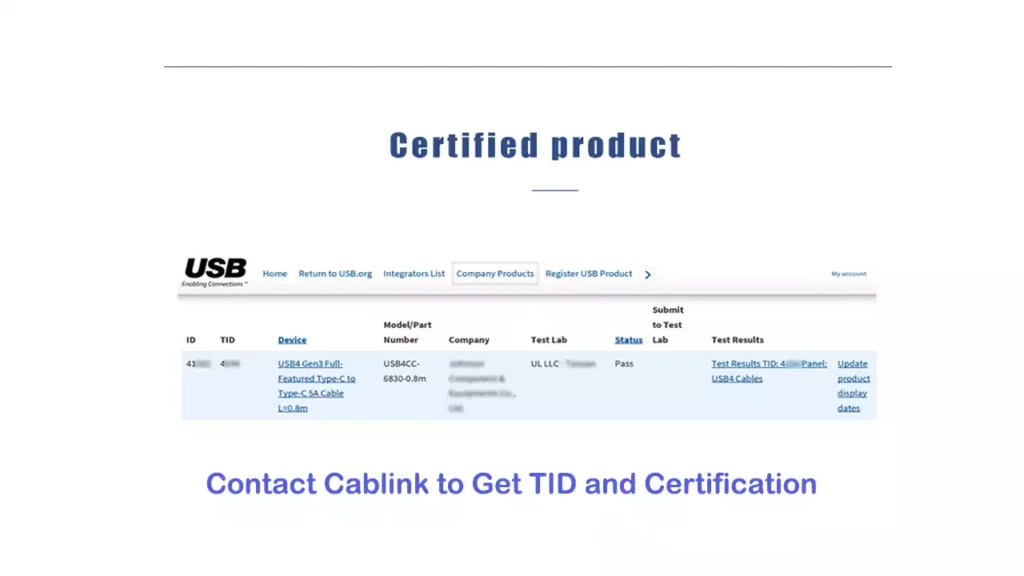
- 通过测试后,您将收到一个测试 ID 号 (TID),用于提交 Windows 硬件实验室套件 (HLK)。.
- 自测选项:
- 下载 USB 命令验证工具并运行所需的测试。.
- 提交Windows认证资格考试结果。.
这些步骤确保认证产品符合严格的安全性和性能标准。遵循此流程,制造商可以自信地将其产品作为 USB-IF 认证产品进行销售。.
USB-IF认证USB线缆的4大优势
安全性和可靠性
USB-IF认证线缆经过严格测试,符合严格的安全标准。这些线缆能够保护您的设备免受过热、短路或浪涌等风险的影响。您可以信赖它们,它们能够提供稳定的性能,而不会损害您的设备。未经认证的线缆通常缺乏这种质量控制,这会增加设备损坏的风险。.
笔记使用认证线缆可以确保在充电或传输数据时更加安心。.
与设备的兼容性
经认证的线缆旨在与各种设备无缝兼容。无论您使用智能手机、平板电脑还是笔记本电脑,USB-IF 认证线缆都能确保连接稳定可靠。这种兼容性减少了线缆连接不畅或功能异常带来的烦恼。您可以信赖这些线缆,它们适用于新旧设备。.
最佳性能
经 USB-IF 认证的线缆提供更快的数据传输速度和更高效的供电。它们专为满足现代设备的需求而设计,确保流畅的性能。例如,经认证的 USB Type-C 线缆支持高速数据传输和快速充电,是日常使用的理想之选。.
消费者信任
选择USB-IF认证的线缆,就意味着您投资了一款符合行业标准的产品。该认证如同品质保证,让您对购买的产品充满信心。值得信赖的制造商会优先考虑认证事宜,以确保其产品满足您的期望。这种信任能够带来更佳的用户体验和长期的满意度。.
认证USB线缆与非认证USB线缆的区别
特征 | 认证的USB线缆 | 未经认证的USB线缆 |
安全 | 经过安全性和可靠性测试 | 过热或损坏的风险更高 |
兼容性 | 适用于多种设备 | 可能无法与所有设备连接 |
表现 | 提供最佳数据传输和充电性能 | 速度较慢且动力不稳定 |
耐久性 | 采用优质材料制成 | 容易磨损 |
消费者信任 | 符合行业标准 | 缺乏认证或批准 |
经过认证的线缆在各个方面都明显优于未经认证的线缆。选择 USB IF 认证的 USB 线缆,确保您获得安全、兼容且性能卓越的产品。.
如何识别 USB-IF 认证的线缆?
识别 USB-IF 标志
USB-IF 标志是识别认证线缆最简便的方法之一。USB 开发者论坛 (USB-IF) 制定了严格的标志使用指南,以确保清晰易懂并提升产品质量。认证线缆的每个连接器上都带有特定的标志,表明其符合 USB 标准。这些标志会根据线缆的规格和功能而有所不同。例如:
- USB 3.2 数据线可能会显示“SuperSpeed”标志,以突出其高速数据传输能力。.
- USB Type-C 数据线可能包含“认证 USB 充电器”标志,以强调其符合供电标准。.
看到这些标志,就可以相信该电缆符合安全和性能标准。.
检查包装和产品详情
包装和产品详情也能提供有关认证的信息。请查看包装盒或线缆上的认证标签或标记。这些标签通常包含 USB-IF 标志,以及线缆的规格信息,例如数据传输速度或供电能力。.
部分厂商会在包装上印制测试编号 (TID)。该编号表明线缆已通过 USB-IF 合规性测试。您也可以在 USB-IF 网站上验证 TID,以确保其符合标准。请务必仔细阅读产品说明,避免购买未经认证的线缆。.
提示避免购买包装信息模糊或缺失的线缆。经过认证的线缆通常会提供清晰的功能特性和合规性信息。.
值得信赖的制造商和品牌
选择值得信赖的品牌是确保获得 USB-IF 认证线缆的另一种方法。信誉良好的制造商会优先考虑认证,以维护自身声誉并提供高质量的产品。Anker、Belkin 和 Cable Matters 等都是值得信赖的品牌。这些公司始终如一地生产符合 USB-IF 标准的线缆。.
假冒产品可能是一个问题,尤其是在网上购物时。为了避免买到假冒产品,请从授权零售商或制造商官网购买。查看客户评价和评分以确认产品的真伪。.
笔记假冒数据线通常模仿正品,但缺乏正品的安全性和性能。购买前务必仔细核实来源。.
USB 数据线的类型及其特点
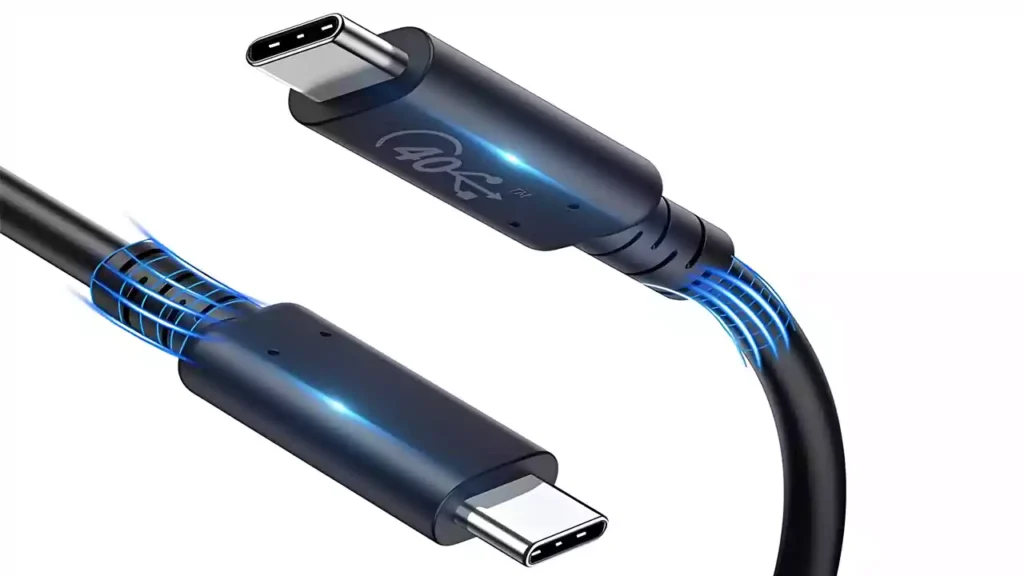
USB线缆类型概述
USB Type-A 线缆
USB Type-A 线缆是最常见的 USB 接口之一。它呈矩形,常用于电脑、充电器和其他设备。大多数标准 USB 线缆的一端都带有 Type-A 接口,用于连接笔记本电脑、台式机或墙式适配器。虽然 USB Type-A 支持多种 USB 版本(从 USB 1.0 到 USB 3.2),但它的设计是不可逆的,这意味着插入时必须确保方向正确。.
USB Type-B 数据线
USB Type-B 数据线在日常生活中已不常见,但对于某些特定设备而言仍然必不可少。这些数据线通常用于连接打印机、扫描仪以及部分外置硬盘与电脑。Type-B 接口呈方形,边缘带有斜角,便于识别。尽管无线技术的普及降低了其普及度,但 USB Type-B 数据线仍然支持 USB 3.1 标准,确保与现代设备的兼容性。.
USB Type-C 数据线
USB Type-C 线缆 USB Type-C 是目前最先进、用途最广泛的 USB 连接器。其正反可插的设计彻底解决了插头对位不准的烦恼。该线缆支持电源和数据传输,是设备充电和文件传输的理想之选。USB Type-C 的主要特性包括:
- 高功率输出,实现快速充电。.
- 兼容 DisplayPort 和 Thunderbolt 等其他接口模式。.
- 支持高质量视频和音频信号,包括高达 8K 分辨率。.
- 通过 USB 电源传输 (PD) 协议识别电缆功能的 E-Marker 芯片。.
凭借其双重功能和与众多设备的互操作性,USB Type-C 已成为现代电子设备的标准。.
USB线缆的主要规格
数据传输速度(USB 2.0 至 USB 4.0)
USB 线缆的数据传输速度因版本而异。USB 2.0 支持最高 480 Mbps 的速度,而 USB 3.0 和 3.1 的速度分别提升至 5 Gbps 和 10 Gbps。最新的 USB 4.0 标准提供…… 速度高达 40 Gbps,, 因此,它非常适合传输大型文件或流式传输高清视频。选择与设备 USB 版本匹配的线缆可确保最佳性能。.
功率输送能力
不同类型的 USB 线缆的供电能力各不相同。USB-C 可以 发射功率最高可达15瓦 无需遵循 USB-PD 规范。对于更高的功率级别,需要特定的引脚和额外的电源管理功能。最新的 USB 电源传输标准 支持最高 240W, 满足笔记本电脑和显示器等高耗电设备的供电需求。使用 USB IF 认证的 USB 线缆可确保安全高效的供电。.
连接器兼容性
选择 USB 数据线时,接口兼容性至关重要。USB Type-A 和 Type-B 接口适用于较旧的设备,而 USB Type-C 接口则可与现代设备广泛兼容。Type-C 接口还支持 Thunderbolt 等其他模式,进一步增强了其通用性。务必检查设备的接口类型,以确保所选数据线完美匹配。.
USB-IF认证与其他认证的比较
USB-IF 与其他认证(例如,Apple MFi、HDMI、CE、UL)的比较
USB-IF认证专注于USB标准,确保线缆和设备符合严格的安全、兼容性和性能标准。其他认证,例如Apple MFi(Made for iPhone/iPad)、HDMI、CE和UL,则服务于不同的目的。例如:
认证 | 目的 | 重点领域 |
USB论坛 | 确保 USB 线缆/设备符合行业标准 | USB安全性和兼容性 |
Apple MFi | 为苹果设备配件颁发认证 | 苹果专用兼容性 |
HDMI | 检查HDMI线缆/设备是否支持视频/音频传输 | 高清媒体传输 |
CE | 确认符合欧洲安全、健康和环境法律 | 一般产品安全 |
UL | 测试产品的电气安全性 | 电气安全标准 |
苹果MFi认证主要面向苹果用户,而USB-IF认证则普遍适用于所有USB设备。HDMI认证侧重于媒体传输,而CE和UL认证则关注更广泛的安全问题。USB-IF认证的突出之处在于其对USB技术的普遍适用性。.
USB-IF认证为何脱颖而出
USB-IF认证确保线缆符合通用标准,这与针对特定品牌或地区的认证不同。它保证了线缆的安全性、最佳性能以及跨设备的兼容性。例如,USB-IF认证的USB线缆可以与智能手机、笔记本电脑和其他设备无缝配合使用。这种通用方法减少了对多种线缆的需求,简化了您的技术设置。.
此外,USB-IF认证强调严格的测试。认证线缆需经过数据传输速度、供电能力和耐用性方面的评估。这一流程确保您获得可靠的产品,保护您的设备免受过热或短路等风险的影响。.
USB-IF认证影响的洞察
USB-IF认证彻底改变了科技行业。它通过鼓励制造商达到高标准来促进创新。这项认证也建立了消费者信任,因为用户知道经过认证的产品性能稳定可靠。例如,USB-IF认证的线缆支持更快的充电和数据传输速度,从而提升用户体验。.
此外,USB-IF认证有助于提升全球兼容性,确保不同厂商的设备能够无缝协作。这种标准化还能减少电子垃圾,因为用户只需一根线缆即可连接多个设备。选择认证产品,您也为构建更可持续、更高效的科技生态系统贡献力量。.
选择 USB 数据线时需要考虑的关键因素
耐用性和制造质量
材料与施工
USB 数据线所用材料对其耐用性有显著影响。优质数据线通常采用坚固的外层材料,以保护内部元件。. 以下是高档线缆中常用材料的详细介绍。:
材料 | 描述 |
PVC | 不易燃、坚固耐用、耐候性强。. |
TPE | Offers elasticity and strength; eco-friendly and recyclable. |
Nylon | Adds extra strength and shields the copper core from tension damage. |
When selecting a cable, look for these materials in the product description. They ensure the cable can withstand daily wear and tear, making it a reliable choice for long-term use.
Connector strength
The connectors are another critical factor in a cable’s durability. Weak connectors can loosen or break after repeated use. Certified cables often feature reinforced connectors designed to handle frequent plugging and unplugging. This added strength reduces the risk of damage, ensuring a secure connection every time.
Speed and performance
Matching cable speed with device needs
Not all USB cables deliver the same data transfer speeds. USB versions range from 2.0 (480 Mbps) to 4.0 (40 Gbps). Choosing the right cable depends on your device’s requirements. For instance, if you frequently transfer large files or stream high-resolution videos, a USB 3.1 or 4.0 cable is ideal. Using a USB IF Certified USB cable ensures you get the advertised speed and performance without interruptions.
提示: Always check your device’s USB version to avoid bottlenecks in speed.
Device compatibility
Ensuring compatibility with your devices
Non-certified cables often cause compatibility issues. These problems arise when cables fail to meet USB-C standards or have incorrect wiring. Common issues include:
- Devices receiving incorrect voltage, risking overvoltage damage.
- Misjudged power draw due to improper Configuration Channel (CC) termination.
- Inability to connect or function with certain devices.
Certified cables eliminate these risks by adhering to strict standards. They ensure seamless compatibility across a wide range of devices, protecting your gadgets from potential harm.
Cable length and flexibility
Choosing the right length for convenience
The length of a USB cable plays a significant role in its usability. Choosing the right length ensures convenience and avoids unnecessary frustration. A cable that is too short might limit your ability to use your device comfortably, while an overly long cable can create clutter and reduce efficiency.
When selecting a cable, consider how and where you plan to use it. For example, a shorter cable (around 1-3 feet) works well for charging devices on a desk or connecting nearby gadgets. These cables reduce tangling and are easier to manage. On the other hand, longer cables (6 feet or more) are ideal for situations where outlets are far from your workspace or when you need flexibility to move around while charging.
提示: Measure the distance between your device and the power source or connection point before purchasing a cable. This ensures you pick the most suitable length.
Here’s a quick comparison to help you decide:
电缆长度 | Best Use Case | Pros | Cons |
1-3 feet | Desk setups, close-range connections | Compact, easy to store | Limited range |
3-6 feet | General use, moderate distance connections | Versatile, suitable for most needs | Slightly bulkier |
6+ feet | Long-distance charging or hard-to-reach areas | Maximum flexibility | Can tangle or slow charging speed |
Keep in mind that longer cables may experience slight power loss or slower data transfer due to increased resistance. Certified USB cables minimize this issue by adhering to strict quality standards. Always choose a USB-IF certified cable to ensure reliable performance, regardless of length.
笔记: Avoid excessively long cables unless absolutely necessary. They can reduce charging efficiency and create unnecessary clutter.
By selecting the right cable length, you can enhance your device’s usability and maintain a tidy workspace.
How USB-IF Certification Supports Manufacturers
The Benefit of USB-IF Certified Manufacturer
USB-IF certification offers significant advantages for manufacturers. By meeting the rigorous standards set by USB-IF, manufacturers can ensure their products deliver reliable performance and safety. This certification also enhances customer trust and satisfaction, as users experience fewer issues with certified devices.
Here’s a breakdown of the benefits manufacturers gain from USB-IF certification:
Advantage | 描述 |
Improved customer experience | Enhances user satisfaction with USB devices. |
Prevention of crashes and hangs | Reduces the likelihood of system failures related to USB devices. |
Reduced troubleshooting time | Minimizes the time spent resolving issues related to noncompliance. |
Marketing benefits | Ability to use the USB logo on products for promotional purposes. |
Listing on USB-IF Integrators List | Increases visibility and credibility among consumers and partners. |
Participation in Compliance Workshops | Access to workshops that help manufacturers stay updated on compliance standards and practices. |
These benefits not only improve product quality but also give manufacturers a competitive edge in the market.
Ensuring USB Cable Stay Up to Date
USB-IF certification ensures that USB cables remain compatible with evolving technology. Certified cables undergo regular updates to meet new standards, such as faster data transfer speeds or higher power delivery. This process allows manufacturers to keep pace with industry advancements and maintain product relevance.
For example, a USB IF Certified USB cable supports modern features like USB Power Delivery (PD) and USB 4.0 speeds. These updates ensure compatibility with the latest devices, reducing the need for frequent replacements. By adhering to USB-IF standards, manufacturers can future-proof their products and provide long-term value to consumers.
Application Process for Manufacturers
The USB-IF certification process involves several steps. Manufacturers must follow these steps to ensure their products meet compliance standards:
- Testing at Authorized Labs: Submit your USB devices to a USB-IF authorized independent test lab for compliance testing.
- Registration: Register with the lab and obtain a valid vendor ID (VID).
- Testing Duration: Expect the testing process to take one to two weeks for a single USB device.
- Certification Privileges: After passing the tests, you can use the USB logo and list your product on the USB-IF Integrators List.
- Test ID Number: Receive a Test ID number (TID) after successful testing, which is necessary for further Windows HLK tests.
While the process is thorough, it ensures that only high-quality products receive certification. This rigorous approach benefits both manufacturers and consumers by promoting safety and reliability.
提示: Address common challenges during testing, such as power reporting errors or improper device enumeration, to avoid delays in certification.
Difference between USB Type-C and USB-IF certification
USB Type-C and USB-IF certification serve different purposes, but both play crucial roles in ensuring a safe and efficient user experience. USB Type-C refers to the physical design and specifications of the connector, while USB-IF certification guarantees that a product meets industry standards for safety, compatibility, and performance.
Here’s a comparison to help you understand the key differences:
规格 | 描述 |
Defines the mechanical design and mounting guidelines for USB-C connectors. | |
USB Type-C Authentication Specification | Establishes security protocols for USB-C devices. |
USB Power Delivery Specification | Introduces commands for adjusting power and data roles after connection. |
USB 3.2 Specification | Adds new SuperSpeed+ transfer modes, doubling data rates over USB-C. |
USB4 Specification | Exclusively applies to USB-C for high-speed data transfer. |
USB-IF certification ensures that USB Type-C products meet additional requirements, such as:
- Prohibiting proprietary charging methods over USB Type-C.
- Requiring certified connectors for all USB Type-C products.
- Mandating Emarker implementation for Gen 1 USB Type-C to USB-C cables.
- Testing the flip-ability of USB Type-C connectors.
- Setting specific certification standards for USB Type-C power banks.
While USB Type-C focuses on the connector’s design and functionality, USB-IF certification ensures the product’s overall quality and safety. Choosing a USB-IF certified USB Type-C cable guarantees you get the best of both worlds—modern design and reliable performance.
笔记: Always verify that your USB Type-C cables carry USB-IF certification to avoid compatibility or safety issues.
USB-IF certification plays a vital role in ensuring the safety, compatibility, and performance of your USB cables. By choosing a USB IF Certified USB cable, you protect your devices from potential risks like overheating or data loss. Certified cables also guarantee seamless compatibility with a wide range of gadgets, making your tech experience hassle-free.
Always prioritize certified cables for a reliable and secure connection. To avoid counterfeit products, purchase from trusted manufacturers or authorized retailers. This simple step ensures you get a high-quality cable that meets industry standards and keeps your devices safe.
结论
In this article, we have explained everything about USB-IF in detail, including what is USB-IF, how to choose USB cables certified by USB-IF, the importance of USB-IF, and how it differs from other certifications. If you have any further questions, please feel free to contact us.
常问问题
为什么选择 USB-IF 认证的线缆而不是更便宜的线缆?
USB-IF certified cables offer safety, reliability, and performance that cheaper, uncertified options cannot match. Certified cables undergo rigorous testing to meet industry standards. This ensures they deliver consistent power and data transfer without risking your devices. Cheaper cables often lack proper quality control, which can lead to overheating, short circuits, or even permanent damage to your gadgets.
When you use a USB IF Certified usb cable, you protect your devices and enjoy peace of mind. Certified cables also work seamlessly with a wide range of devices, reducing frustration caused by compatibility issues. While uncertified cables may seem like a bargain, they often cost more in the long run due to potential device repairs or replacements.
如何辨别假冒数据线?
Counterfeit cables can look similar to certified ones, but they lack the safety and performance of genuine products. To identify a fake cable, start by checking for the USB-IF logo on the connectors or packaging. Genuine certified cables always display this logo. Next, examine the packaging for clear details about the cable’s specifications and compliance. Certified cables often include a Test ID (TID) number, which you can verify on the USB-IF website.
Pay attention to the build quality as well. Counterfeit cables often feel flimsy or have poorly finished connectors. Purchasing from trusted brands or authorized retailers is the best way to avoid fake products. Always read customer reviews and ratings before making a purchase.
提示: If a deal seems too good to be true, it probably is. Stick to reputable sources for your cables.
USB-IF认证的线缆更贵吗?
USB-IF certified cables may cost slightly more than uncertified ones, but the benefits far outweigh the price difference. Certified cables provide better durability, faster data transfer speeds, and safer power delivery. These features make them a worthwhile investment.
Uncertified cables might save you a few dollars upfront, but they often fail quickly or damage your devices. This can lead to higher costs for repairs or replacements. By choosing a certified cable, you ensure long-term reliability and avoid unnecessary expenses. Think of it as paying a little extra now to save more in the future.
未经认证的线缆会损坏设备吗?
Non-certified USB cables pose significant risks to your devices. These cables often fail to meet the safety and performance standards set by USB-IF. As a result, they can cause overheating, short circuits, or even permanent damage to your gadgets. For example, uncertified cables may deliver inconsistent power, leading to battery degradation over time. They might also lack proper shielding, which increases the risk of data corruption during transfers.
Another common issue with non-certified cables is incorrect wiring. Poorly designed cables can send the wrong voltage to your device. This can result in overvoltage damage, which may render your device unusable. Additionally, uncertified cables often use substandard materials, making them prone to wear and tear. Frayed or broken cables can expose internal wires, creating a fire hazard.
Using non-certified cables also increases the likelihood of compatibility problems. These cables may not work with all devices, leaving you frustrated when they fail to charge or transfer data. Certified cables, on the other hand, undergo rigorous testing to ensure they meet safety and compatibility standards. By choosing USB-IF certified cables, you protect your devices and enjoy a reliable user experience.
提示: Always inspect your cables for signs of wear or damage. Replace uncertified or faulty cables immediately to avoid potential harm to your devices.
为什么要优先选择 USB-IF 认证的线缆?
USB-IF certified cables ensure safety, compatibility, and performance. They undergo rigorous testing to meet industry standards. Non-certified cables may cause overheating, device damage, or slow data transfer. Choosing certified cables protects your devices and guarantees a reliable experience.
提示: Always check for the USB-IF logo to confirm certification.
如何验证一条数据线是否通过了 USB-IF 认证?
请查看线缆或包装上的 USB-IF 标志。部分产品还会显示测试 ID (TID) 编号。您可以在 USB-IF 网站上验证此编号。Anker 或 Belkin 等知名品牌通常会提供经过认证的线缆。.
USB-IF认证的线缆值得额外花钱吗?
是的,它们物有所值。认证线缆更耐用、传输速度更快、供电更安全。非认证线缆虽然可能前期省钱,但存在损坏设备的风险。投资认证线缆可确保长期可靠性,减少更换次数。.
未经认证的线缆会损坏您的设备吗?
Yes, uncertified cables can cause overheating, short circuits, or incorrect voltage delivery. These issues may permanently damage your devices. Certified cables adhere to strict safety standards, protecting your gadgets from such risks.
笔记: Replace damaged or uncertified cables immediately to avoid potential hazards.
USB-IF认证和苹果MFi认证有什么区别?
USB-IF certification applies to all USB devices, ensuring universal compatibility and safety. Apple MFi certification focuses on accessories designed for Apple products. While MFi ensures compatibility with Apple devices, USB-IF certification guarantees broader device compatibility and performance.
Example: A USB-IF certified cable works with both Apple and non-Apple devices.